Resources
Blog
AI and Data

SLMs vs LLMs: When a smaller AI model is the smarter choice

When does your AI workflow need a large model, and where could a smaller one do the job? Compare SLMs vs LLMs across cost, accuracy, speed, and deployment to choose the right model for each task.

By
Kush Shankar
October 14, 2026
Small and large AI robots working together, representing complementary SLM and LLM capabilities.
Key takeaways
  • Match model size to each step’s reasoning need, not one large model for the whole workflow.
  • Narrow, repeatable tasks run fine on smaller models; save large models for ambiguous or high-stakes steps.
  • Agentic workflows multiply cost fast, so measure cost per successful outcome, not price per token.
  • Model routing can send each step to the right model automatically.
  • Fine-tuning a small model for a narrow domain boosts performance and widens deployment options.
  • Seven factors (task breadth, reasoning, volume, latency, deployment, data sensitivity, failure cost) guide model choice.

‍

Your production AI workflow does more work than you see on screen. One request can trigger classification, retrieval, tool selection, extraction, validation, planning, and a final response.

A workflow can make 15 model calls per request. At 100,000 requests a day, that's 1.5 million inference calls. Scale that to a month, and you're at 45 million. At that volume, your model choice shapes cost, response time, and infrastructure load. A prototype hides these effects. Production does not.

For a CTO or AI leader, benchmark scores are only part of the decision. You need to know how much capability each step needs, what quality bar it must clear, and what it costs to meet that bar.

Small language models, or SLMs, matter because many production tasks are narrow. They repeat the same pattern. Classification, extraction, formatting, routing, and simple tool use often need less reasoning than complex planning does. Large language models still earn their place when a workflow hits ambiguity or unfamiliar input.

A practical model strategy starts by breaking down the workload. Once you see the work inside your application, you can see where an SLM fits, where you need an LLM, and where a hybrid setup works best.

The SLM vs LLM decision starts with the workload

No fixed size cleanly separates an SLM from an LLM. Model families come in different sizes, and deployment needs shift with quantization, context length, serving setup, and hardware. AWS describes the definition of an SLM as still evolving and emphasizes lower resource requirements for specialized deployment.

For enterprise architecture, footprint tells you more than size alone. An SLM can provide useful language capability with lower compute and memory needs than a much larger model. Larger models can offer broader capability and stronger performance on some complex or unfamiliar reasoning tasks, but results still depend on the model family and the workload.

Workload fit tells you more than the label does. A document classifier might sort text into twelve categories. A procurement assistant might read conflicting supplier data and suggest a next step. Both use language models. But they need different levels of reasoning.

Once you judge model choice at the task level, SLMs and LLMs stop competing for one job. They can do different jobs inside the same system.

SLMs vs LLMs at a glance
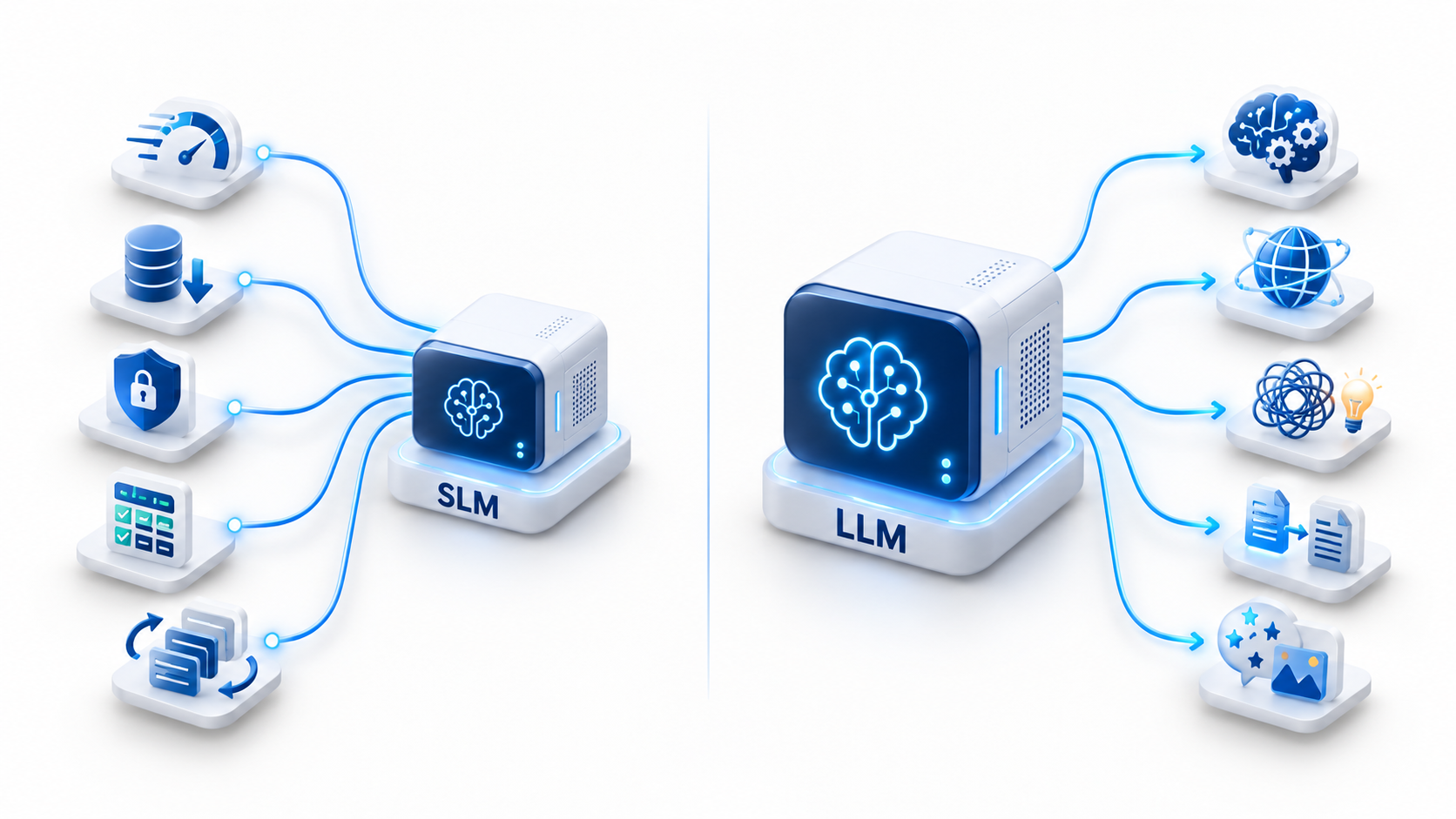
SLMs favor efficiency; LLMs favor deeper reasoning.

Hardware, model family, context length, quantization, batching, and workload design can all shift the result.

A real evaluation needs production-like data. It needs clear pass criteria. Test your candidate models against the quality bar first. Then compare cost, latency, infrastructure load, and upkeep.

Why smaller models can now carry more production work

The capability gap between small and large models has narrowed for many focused tasks. Better training data, knowledge distillation, synthetic-data generation, and quantization have all expanded what smaller models can handle while reducing serving requirements.

Amazon Bedrock Model Distillation automates this pattern by using a larger teacher model to generate training responses and fine-tune a smaller student model for a specific use case.

These methods change how you build a workload. A smaller model built for a fixed document schema, a known product list, or a limited tool set can do the job well. So can one built for a known product list, or a limited tool set. It does this without the full weight of a frontier-scale model.

Size alone tells your team little about value. Ask instead: does the model do its job at the quality level you need? Does it do this under your real operating conditions?

A procurement classifier may not need deep reasoning. A structured extraction tool may not need broad world knowledge. A router may pick from eight known actions. Narrow tasks leave room for small models, because your application already sets the boundaries.

Repeated work creates a strong SLM business case
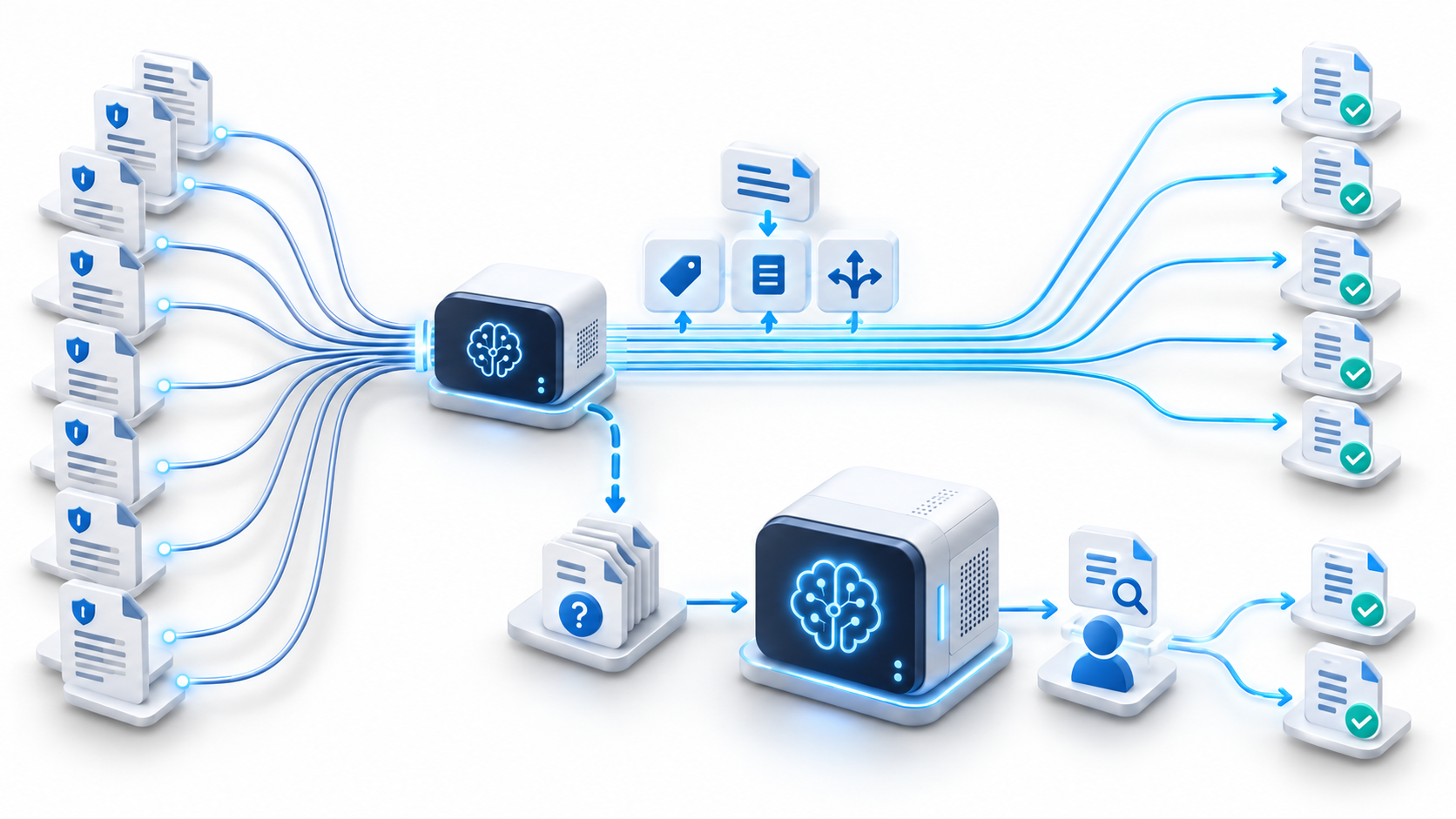
Routine document tasks stay on smaller models.

Consider an insurance claims workflow. It handles a high volume of submissions every month. The app must spot the claim type. It must pull policy details, flag missing documents, find matching policy content, route the case, review exceptions, and draft a response.

Many of these steps sit within tight limits. Classification picks from a known list of claim types. Extraction maps text into a fixed schema. Missing-document checks look for expected proof. Routing follows a set path.

Exception review is different. Conflicting evidence and odd policy language need deeper thought. A stronger LLM fits better once a case reaches this point.

A hybrid setup gives each model a clear job. Send repeat tasks to a tested SLM. Save deep reasoning for cases that need it. This gets more valuable as volume grows. Cutting needless large-model calls lowers your inference spend. It can also cut response time.

The same pattern fits support triage, document processing, procurement work, entity recognition, internal knowledge tasks, and limited RAG apps. Each case gets easier once you split routine work from open-ended reasoning.

Production economics change when model calls multiply
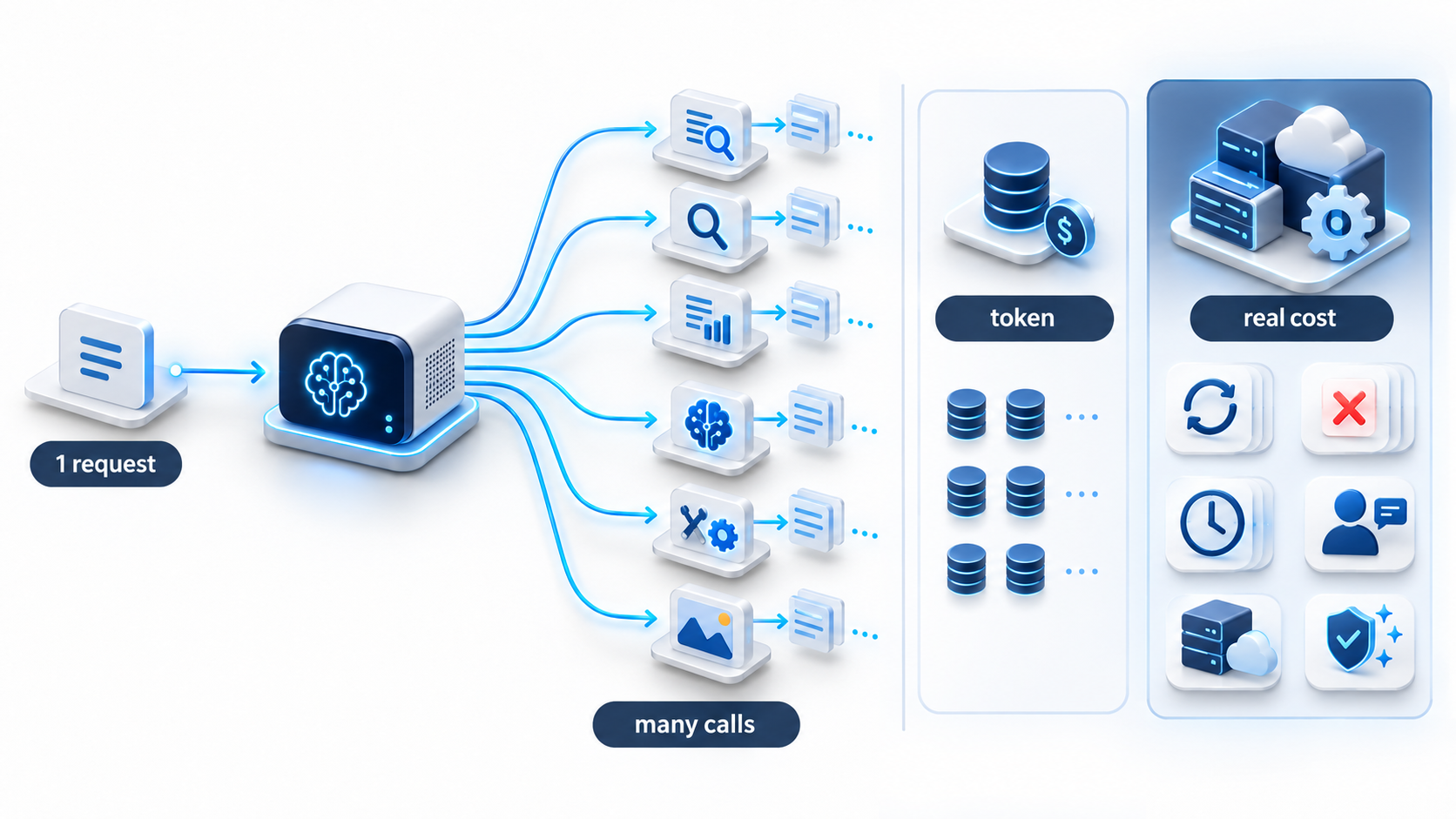
Multiple AI calls increase production cost.

Token price gets a lot of attention during model selection. But the price per token is only one part of your cost. A cheap model call can turn costly if weak output causes retries, manual checks, delays, or fixes downstream.

A better measure is cost per successful outcome. This figure can fold in inference spend, retries, failed outputs, human review, latency, infrastructure, and errors.

Quality must clear your production bar first. Cost comparisons only matter after that. A small model earns its place once it meets your workload's bar with enough consistency. Once several models clear that bar, compare their running cost and their upkeep effort.

This matters most in agentic systems. One business request can spawn many internal calls there. A small saving per call adds up fast. Weak routing adds cost through retries and errors.

‍

Build the architecture that routes work to the right model

Applify builds the routing, fine-tuning, and monitoring layer that puts the right model on every step of your production AI system.
Get in touch

Agentic AI raises the value of model routing

Agentic apps break a request into a chain of decisions. An agent may read intent, build a plan, pick tools, pull data, extract fields, check a result, and write the final answer.

Each step can need a different level of reasoning. Intent classification may pick from a small set of categories. Tool selection may pick from a known list of actions. Planning may need to work through gaps across several topics.

A routing layer can send each step to the right model. It can weigh task type, quality bar, latency target, confidence, and the cost of getting it wrong. The router keeps simple work on a small model. It moves hard cases to a model with stronger reasoning.

Model routing is already available as a managed production capability. Amazon Bedrock Intelligent Prompt Routing became generally available in April 2025 and routes requests between models in the same family using predicted response quality and cost.

This setup gives your AI team a range of tools, not one fixed model. SLMs handle specialist work. LLMs manage hard reasoning. Embedding models support search. Vision models read documents. Plain software rules enforce business logic.

Model choice becomes one piece of a bigger puzzle. You still need fallback plans, version control, monitoring, test data, security checks, and live tracking to keep routing reliable.

Smaller models also widen deployment options

Where inference runs can shape your architecture before cost even enters the picture.

A factory system may need answers close to the equipment. A field app may run on weak connections. A regulated workload may need infrastructure you control fully. An interactive app may need a fast response time.

SLMs open up more deployment options. Small models often need less memory and compute. You can run them on private servers, edge devices, workstations, factory floors, or phones. These are places where a huge model would be hard to run.

Local deployment does not create privacy on its own. Security still comes down to data movement, logs, access controls, who owns the infrastructure, and how you govern it. The real gain is control over where inference runs.

Latency needs the same close look. Model size shapes response time. But so do serving setup, context length, hardware use, batching, network distance, and how deep the reasoning goes. Test your real environment before you commit to a design.

Fine-tuning can make an SLM valuable inside a narrow domain

A general-purpose LLM is designed to handle a broad range of prompts. Your enterprise application often operates inside a much narrower domain.

A support app may use one product list, one ticket format, a fixed set of actions, and set output formats. A procurement workflow may see the same supplier language, document types, fields, and approval steps again and again.

Fine-tuning an SLM on these patterns can improve task performance while preserving a smaller serving footprint. AWS's 2025 guidance shows how a larger teacher model can generate synthetic training data for a smaller student model in a domain-specific workflow.

The case for this grows stronger when your workload stays steady. runs at real volume, and has a clear way to test results.

Specialization creates one risk to watch. Input can drift past what the model learned. Your test data, tracking, and escalation rules need to catch this early.

SLMs lose their advantage when the workload becomes unpredictable

Smaller models in the same family often have less broad capability than larger variants. The difference can matter when a task requires deep research, complex planning, or reasoning across several domains.

A model can do well on a narrow test and still struggle in production. Real input brings edge cases the test set never saw. Weak results here cause retries, wrong tool calls, broken output, or extra human review.

Larger models can justify their higher cost when failures carry real business weight. Reserve stronger reasoning capability for cases where the task complexity or cost of failure calls for it.

Routing provides a practical way to separate predictable work from harder cases. Keep steady, well-bounded tasks on a specialist model and escalate unclear or complex cases to a model with stronger reasoning.

Seven questions to answer before choosing a model

How broad is the task?

A narrow, well-bounded task may favor an SLM. A general assistant handling broad or unpredictable requests may need a larger model.

How much reasoning does the task require?

Classification needs less depth than multi-step analysis. Set your reasoning depth before you compare models.

How much volume will the workload generate?

High volume amplifies cost. Small per-call gaps add up fast across millions of calls.

How quickly must the system respond?

Voice tools, real-time voice agents, coding tools, and robotics often need fast replies. Test the model and its serving setup together.

Where must inference occur?

Cloud, private servers, on-site systems, edge devices, and phones each set their own limits. Where you deploy can rule out some models before testing starts.

How sensitive is the data?

Decide where your data can travel and what controls apply. Smaller models can make local or self-hosted deployment easier, but security still depends on the full architecture.

What does failure cost?

A small format error costs little to fix. A bad call in a regulated process can cost a lot. Let failure cost guide your model choice, checks, and review steps.

A practical workload matrix for SLMs and LLMs
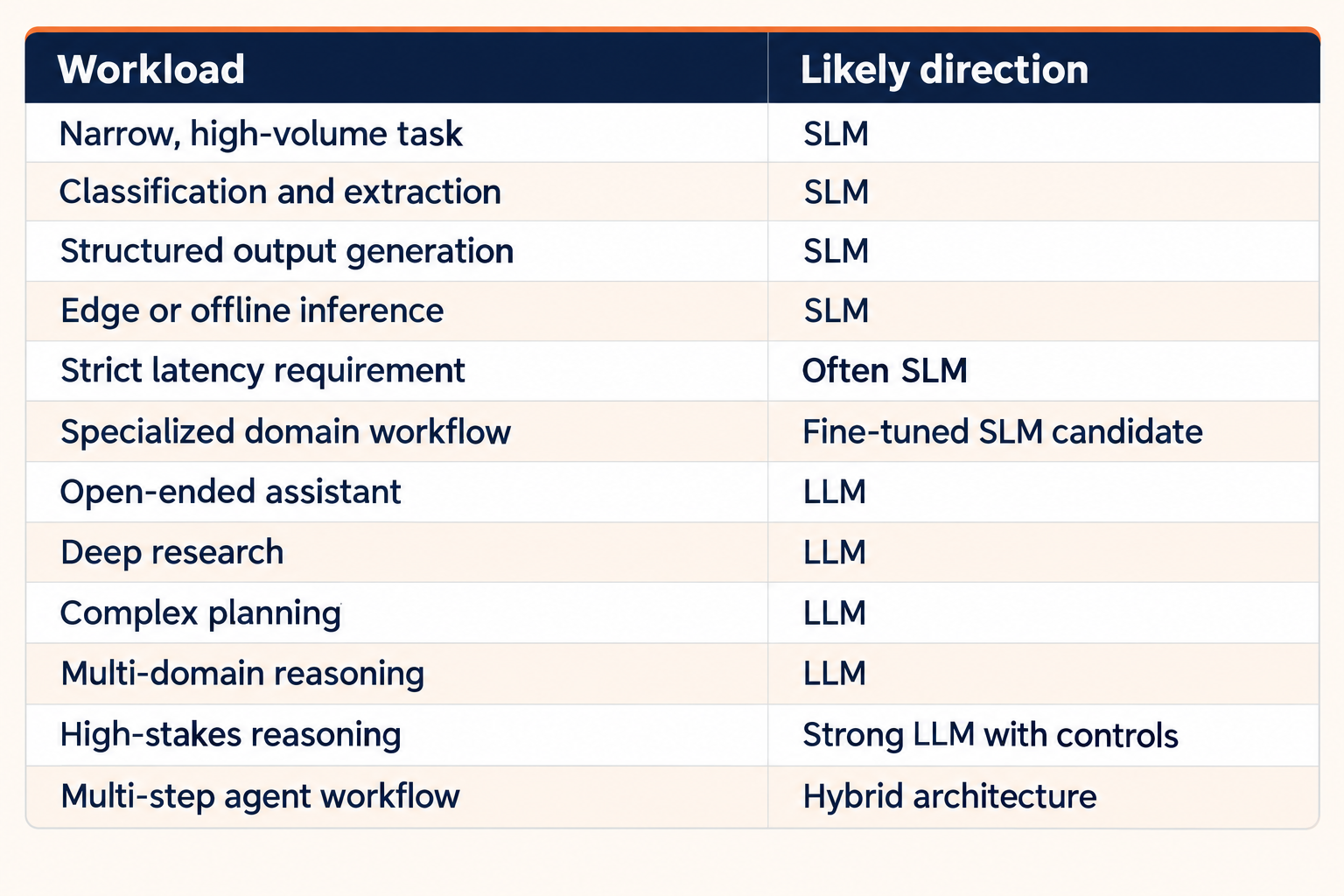
Twelve AI workloads mapped to likely SLM, LLM, or hybrid approaches, with qualifications for latency, specialization, and high-stakes reasoning.

Alt text: Twelve AI workloads mapped to likely SLM, LLM, or hybrid approaches, with qualifications for latency, specialization, and high-stakes reasoning.

The matrix gives architecture teams a working hypothesis for evaluation. Production data should settle the final model choice.

Test task success, latency, failure patterns, retries, operating cost, and the business impact of weak output. Model quality needs evaluation against the process that consumes the result because benchmark scores cannot capture the full production effect.

Enterprise AI is moving toward model orchestration
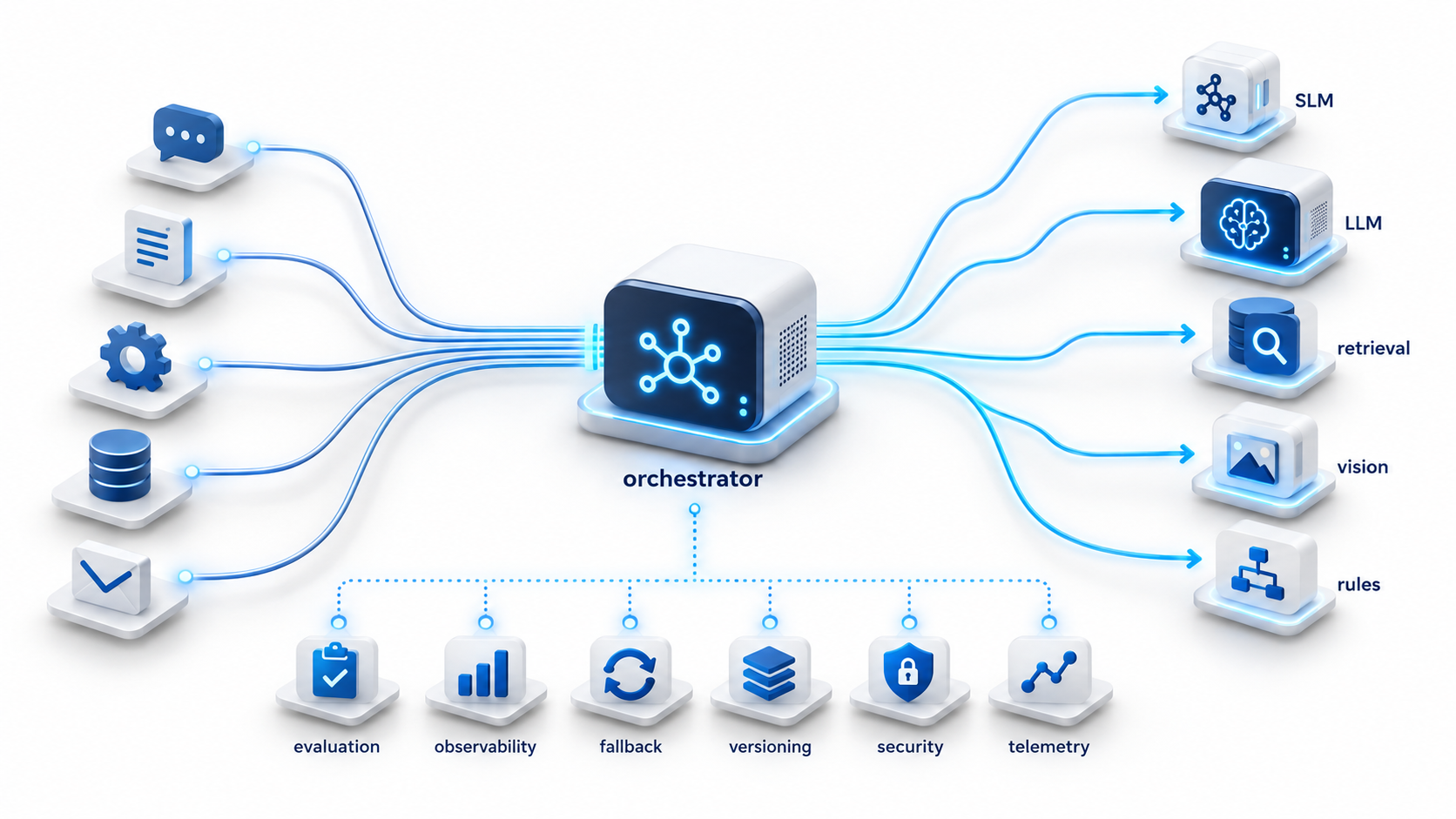
AI routes each task to the right model.‍

The SLM versus LLM debate loses value as a yes-or-no choice. Your app can run several models at once, plus plain software rules, each with its own job.

One model can sort the request. Another can pull out structured data. An embedding model can power search. A vision model can read documents. A bigger reasoning model can dig into unclear cases. Business rules can stay in plain software where you need firm control.

An orchestration layer ties these pieces together. It decides where each task goes. It saves costly reasoning power for work that truly needs it. It keeps routine tasks on a cheaper path.

A strong setup needs more than routing rules. You need model testing, quality bars, backup paths, tracking, version control, security checks, and clear ownership of results. These pieces decide whether a multi-model setup adds speed or adds mess.

A stronger model strategy starts with task economics

Production AI rewards teams who treat model choice the way they treat compute or storage. Each workload has a quality bar, a speed need, a deployment limit, a data risk level, and a failure cost.

SLMs earn their place on focused tasks with clear limits. LLMs stay key when a task needs broad knowledge or deep reasoning on new input. Hybrid systems let you use each model where it adds the most value.

Agentic AI raises the stakes here. One business request can spark a chain of model calls. A sound setup decides how much power each step needs. It checks whether that choice still holds up over time.

Applify helps teams build production AI architecture around workload breakdown, model testing, routing, RAG, fine-tuning, inference infrastructure, monitoring, security, and cost control. Connect with Applify to see how a model setup can match power, cost, and control to the work each AI system does.


‍

Kush Shankar

Data & Engineering Expert

LinkedIn
Ready to activate growth, not just plan for it?
Let's build what's next
Get in touch
Resources
Blog
AI and Data

SLMs vs LLMs: When a smaller AI model is the smarter choice

When does your AI workflow need a large model, and where could a smaller one do the job? Compare SLMs vs LLMs across cost, accuracy, speed, and deployment to choose the right model for each task.

By
Kush Shankar
October 14, 2026
Share
Small and large AI robots working together, representing complementary SLM and LLM capabilities.
Key takeaways
  • Match model size to each step’s reasoning need, not one large model for the whole workflow.
  • Narrow, repeatable tasks run fine on smaller models; save large models for ambiguous or high-stakes steps.
  • Agentic workflows multiply cost fast, so measure cost per successful outcome, not price per token.
  • Model routing can send each step to the right model automatically.
  • Fine-tuning a small model for a narrow domain boosts performance and widens deployment options.
  • Seven factors (task breadth, reasoning, volume, latency, deployment, data sensitivity, failure cost) guide model choice.

‍

Your production AI workflow does more work than you see on screen. One request can trigger classification, retrieval, tool selection, extraction, validation, planning, and a final response.

A workflow can make 15 model calls per request. At 100,000 requests a day, that's 1.5 million inference calls. Scale that to a month, and you're at 45 million. At that volume, your model choice shapes cost, response time, and infrastructure load. A prototype hides these effects. Production does not.

For a CTO or AI leader, benchmark scores are only part of the decision. You need to know how much capability each step needs, what quality bar it must clear, and what it costs to meet that bar.

Small language models, or SLMs, matter because many production tasks are narrow. They repeat the same pattern. Classification, extraction, formatting, routing, and simple tool use often need less reasoning than complex planning does. Large language models still earn their place when a workflow hits ambiguity or unfamiliar input.

A practical model strategy starts by breaking down the workload. Once you see the work inside your application, you can see where an SLM fits, where you need an LLM, and where a hybrid setup works best.

The SLM vs LLM decision starts with the workload

No fixed size cleanly separates an SLM from an LLM. Model families come in different sizes, and deployment needs shift with quantization, context length, serving setup, and hardware. AWS describes the definition of an SLM as still evolving and emphasizes lower resource requirements for specialized deployment.

For enterprise architecture, footprint tells you more than size alone. An SLM can provide useful language capability with lower compute and memory needs than a much larger model. Larger models can offer broader capability and stronger performance on some complex or unfamiliar reasoning tasks, but results still depend on the model family and the workload.

Workload fit tells you more than the label does. A document classifier might sort text into twelve categories. A procurement assistant might read conflicting supplier data and suggest a next step. Both use language models. But they need different levels of reasoning.

Once you judge model choice at the task level, SLMs and LLMs stop competing for one job. They can do different jobs inside the same system.

SLMs vs LLMs at a glance

SLMs favor efficiency; LLMs favor deeper reasoning.

Hardware, model family, context length, quantization, batching, and workload design can all shift the result.

A real evaluation needs production-like data. It needs clear pass criteria. Test your candidate models against the quality bar first. Then compare cost, latency, infrastructure load, and upkeep.

Why smaller models can now carry more production work

The capability gap between small and large models has narrowed for many focused tasks. Better training data, knowledge distillation, synthetic-data generation, and quantization have all expanded what smaller models can handle while reducing serving requirements.

Amazon Bedrock Model Distillation automates this pattern by using a larger teacher model to generate training responses and fine-tune a smaller student model for a specific use case.

These methods change how you build a workload. A smaller model built for a fixed document schema, a known product list, or a limited tool set can do the job well. So can one built for a known product list, or a limited tool set. It does this without the full weight of a frontier-scale model.

Size alone tells your team little about value. Ask instead: does the model do its job at the quality level you need? Does it do this under your real operating conditions?

A procurement classifier may not need deep reasoning. A structured extraction tool may not need broad world knowledge. A router may pick from eight known actions. Narrow tasks leave room for small models, because your application already sets the boundaries.

Repeated work creates a strong SLM business case

Routine document tasks stay on smaller models.

Consider an insurance claims workflow. It handles a high volume of submissions every month. The app must spot the claim type. It must pull policy details, flag missing documents, find matching policy content, route the case, review exceptions, and draft a response.

Many of these steps sit within tight limits. Classification picks from a known list of claim types. Extraction maps text into a fixed schema. Missing-document checks look for expected proof. Routing follows a set path.

Exception review is different. Conflicting evidence and odd policy language need deeper thought. A stronger LLM fits better once a case reaches this point.

A hybrid setup gives each model a clear job. Send repeat tasks to a tested SLM. Save deep reasoning for cases that need it. This gets more valuable as volume grows. Cutting needless large-model calls lowers your inference spend. It can also cut response time.

The same pattern fits support triage, document processing, procurement work, entity recognition, internal knowledge tasks, and limited RAG apps. Each case gets easier once you split routine work from open-ended reasoning.

Production economics change when model calls multiply

Multiple AI calls increase production cost.

Token price gets a lot of attention during model selection. But the price per token is only one part of your cost. A cheap model call can turn costly if weak output causes retries, manual checks, delays, or fixes downstream.

A better measure is cost per successful outcome. This figure can fold in inference spend, retries, failed outputs, human review, latency, infrastructure, and errors.

Quality must clear your production bar first. Cost comparisons only matter after that. A small model earns its place once it meets your workload's bar with enough consistency. Once several models clear that bar, compare their running cost and their upkeep effort.

This matters most in agentic systems. One business request can spawn many internal calls there. A small saving per call adds up fast. Weak routing adds cost through retries and errors.

‍

Build the architecture that routes work to the right model

Applify builds the routing, fine-tuning, and monitoring layer that puts the right model on every step of your production AI system.
Get in touch

Agentic AI raises the value of model routing

Agentic apps break a request into a chain of decisions. An agent may read intent, build a plan, pick tools, pull data, extract fields, check a result, and write the final answer.

Each step can need a different level of reasoning. Intent classification may pick from a small set of categories. Tool selection may pick from a known list of actions. Planning may need to work through gaps across several topics.

A routing layer can send each step to the right model. It can weigh task type, quality bar, latency target, confidence, and the cost of getting it wrong. The router keeps simple work on a small model. It moves hard cases to a model with stronger reasoning.

Model routing is already available as a managed production capability. Amazon Bedrock Intelligent Prompt Routing became generally available in April 2025 and routes requests between models in the same family using predicted response quality and cost.

This setup gives your AI team a range of tools, not one fixed model. SLMs handle specialist work. LLMs manage hard reasoning. Embedding models support search. Vision models read documents. Plain software rules enforce business logic.

Model choice becomes one piece of a bigger puzzle. You still need fallback plans, version control, monitoring, test data, security checks, and live tracking to keep routing reliable.

Smaller models also widen deployment options

Where inference runs can shape your architecture before cost even enters the picture.

A factory system may need answers close to the equipment. A field app may run on weak connections. A regulated workload may need infrastructure you control fully. An interactive app may need a fast response time.

SLMs open up more deployment options. Small models often need less memory and compute. You can run them on private servers, edge devices, workstations, factory floors, or phones. These are places where a huge model would be hard to run.

Local deployment does not create privacy on its own. Security still comes down to data movement, logs, access controls, who owns the infrastructure, and how you govern it. The real gain is control over where inference runs.

Latency needs the same close look. Model size shapes response time. But so do serving setup, context length, hardware use, batching, network distance, and how deep the reasoning goes. Test your real environment before you commit to a design.

Fine-tuning can make an SLM valuable inside a narrow domain

A general-purpose LLM is designed to handle a broad range of prompts. Your enterprise application often operates inside a much narrower domain.

A support app may use one product list, one ticket format, a fixed set of actions, and set output formats. A procurement workflow may see the same supplier language, document types, fields, and approval steps again and again.

Fine-tuning an SLM on these patterns can improve task performance while preserving a smaller serving footprint. AWS's 2025 guidance shows how a larger teacher model can generate synthetic training data for a smaller student model in a domain-specific workflow.

The case for this grows stronger when your workload stays steady. runs at real volume, and has a clear way to test results.

Specialization creates one risk to watch. Input can drift past what the model learned. Your test data, tracking, and escalation rules need to catch this early.

SLMs lose their advantage when the workload becomes unpredictable

Smaller models in the same family often have less broad capability than larger variants. The difference can matter when a task requires deep research, complex planning, or reasoning across several domains.

A model can do well on a narrow test and still struggle in production. Real input brings edge cases the test set never saw. Weak results here cause retries, wrong tool calls, broken output, or extra human review.

Larger models can justify their higher cost when failures carry real business weight. Reserve stronger reasoning capability for cases where the task complexity or cost of failure calls for it.

Routing provides a practical way to separate predictable work from harder cases. Keep steady, well-bounded tasks on a specialist model and escalate unclear or complex cases to a model with stronger reasoning.

Seven questions to answer before choosing a model

How broad is the task?

A narrow, well-bounded task may favor an SLM. A general assistant handling broad or unpredictable requests may need a larger model.

How much reasoning does the task require?

Classification needs less depth than multi-step analysis. Set your reasoning depth before you compare models.

How much volume will the workload generate?

High volume amplifies cost. Small per-call gaps add up fast across millions of calls.

How quickly must the system respond?

Voice tools, real-time voice agents, coding tools, and robotics often need fast replies. Test the model and its serving setup together.

Where must inference occur?

Cloud, private servers, on-site systems, edge devices, and phones each set their own limits. Where you deploy can rule out some models before testing starts.

How sensitive is the data?

Decide where your data can travel and what controls apply. Smaller models can make local or self-hosted deployment easier, but security still depends on the full architecture.

What does failure cost?

A small format error costs little to fix. A bad call in a regulated process can cost a lot. Let failure cost guide your model choice, checks, and review steps.

A practical workload matrix for SLMs and LLMs

Twelve AI workloads mapped to likely SLM, LLM, or hybrid approaches, with qualifications for latency, specialization, and high-stakes reasoning.

Alt text: Twelve AI workloads mapped to likely SLM, LLM, or hybrid approaches, with qualifications for latency, specialization, and high-stakes reasoning.

The matrix gives architecture teams a working hypothesis for evaluation. Production data should settle the final model choice.

Test task success, latency, failure patterns, retries, operating cost, and the business impact of weak output. Model quality needs evaluation against the process that consumes the result because benchmark scores cannot capture the full production effect.

Enterprise AI is moving toward model orchestration

AI routes each task to the right model.‍

The SLM versus LLM debate loses value as a yes-or-no choice. Your app can run several models at once, plus plain software rules, each with its own job.

One model can sort the request. Another can pull out structured data. An embedding model can power search. A vision model can read documents. A bigger reasoning model can dig into unclear cases. Business rules can stay in plain software where you need firm control.

An orchestration layer ties these pieces together. It decides where each task goes. It saves costly reasoning power for work that truly needs it. It keeps routine tasks on a cheaper path.

A strong setup needs more than routing rules. You need model testing, quality bars, backup paths, tracking, version control, security checks, and clear ownership of results. These pieces decide whether a multi-model setup adds speed or adds mess.

A stronger model strategy starts with task economics

Production AI rewards teams who treat model choice the way they treat compute or storage. Each workload has a quality bar, a speed need, a deployment limit, a data risk level, and a failure cost.

SLMs earn their place on focused tasks with clear limits. LLMs stay key when a task needs broad knowledge or deep reasoning on new input. Hybrid systems let you use each model where it adds the most value.

Agentic AI raises the stakes here. One business request can spark a chain of model calls. A sound setup decides how much power each step needs. It checks whether that choice still holds up over time.

Applify helps teams build production AI architecture around workload breakdown, model testing, routing, RAG, fine-tuning, inference infrastructure, monitoring, security, and cost control. Connect with Applify to see how a model setup can match power, cost, and control to the work each AI system does.

‍

You may also like

Why 80 percent of leaders neglect data preparation for AI
AI and Data
63% of organizations lack proper data management practices for AI, and 60% of unsupported AI projects will be abandoned by 2026. (Gartner, 2025)
View case study
12 Mins
Data driven smart manufacturing: how intelligent data turns factories into competitive powerhouses
Data Lake
Explore a practical guide to data driven smart manufacturing, covering AI use cases, analytics architectures, and how manufacturers turn operational data into real-time decisions.
View case study
15 Mins
Data management in manufacturing: Building the foundation for AI-driven operations
Data Lake
Learn how modern data management in manufacturing improves efficiency, enables AI, and drives smarter decisions across operations and supply chains.
View case study