Resources
/
Blog
/
Cloud

Here's what the AWS Partner Central migration changes

Here's what the AWS Partner Central migration changes

If you run any part of your business through the AWS Partner Network (co-sell, Marketplace listings, funding programs, or partner certifications), a significant infrastructure shift is underway.

Atul Sharma
August 6, 2026
6 mins
Share this Article:
Table of content

If you run any part of your business through the AWS Partner Network (co-sell, Marketplace listings, funding programs, or partner certifications), a significant infrastructure shift is underway. AWS is retiring the standalone Partner Central portal and folding it directly into the AWS Management Console, a change often described as the AWS Partner Central console migration since everything now runs through a single AWS interface.

It's easy to file this under "AWS housekeeping" and move on. It shouldn't be. For any organization that relies on Partner Central to manage opportunities, track certifications, or run co-sell motions with AWS, this migration touches identity management, user access, and day-to-day workflows all at once, and it comes with a real cost whether you handle it in-house or not.

What's actually changing

Since November 2025, AWS has been rolling Partner Central into the Console as a native AWS service rather than a separate, Salesforce-backed portal. The practical effects:

  • Authentication moves to IAM. Partner Central access is no longer managed through its own login system. It now runs on AWS Identity and Access Management, using managed policies such as AWSPartnerCentralFullAccess for general access and AWSPartnerCentralOpportunityManagement for anyone (or anything) that needs to create, update, or view ACE opportunities.
  • Marketplace and Partner Central converge. Solution listings, funding requests, ACE opportunities, and program management now live in one console instead of several disconnected tools.
  • Legacy roles don't map one-to-one. Partner Central's old role system (Alliance Lead, Cloud Admin, ACE Manager, ACE User) has to be translated into IAM managed policies via Partner Central Account Management User Role Association, the policy AWS uses to associate a Partner Central user with an IAM role. This is the step most teams underestimate, because the old and new permission models don't line up cleanly.
  • API and automation access need their own trust relationship. Any integration or automation that calls Partner Central's API authenticates through an IAM role whose trust policy allows the partnercentral-account-management.amazonaws.com service to assume it. If you have anything (a script, a reporting tool, a custom integration) hitting Partner Central programmatically, it needs this rebuilt, not just reconnected.
  • A shutdown date is coming. As things stand, AWS has set September 30, 2026 as the deadline for completing the migration, though that date is subject to change at AWS's discretion. Check the migration widget inside your own Partner Central account for the exact date that applies to your organization.

Speed things up with the right partner

To speed up the process, we recommend AWS Partners work with an established AWS Integration Partner for implementation support, since IAM policy mapping and account linking are the two steps most teams underestimate. If you'd rather have a second set of hands on your migration, get in touch with our team to talk through scope and timeline for your setup.

Why this is bigger than an IT ticket

For most partner organizations, Partner Central isn't a side tool. It's where deal registration, co-sell approvals, and funding requests actually happen. A migration that touches identity and access management has three second-order effects worth planning for now:
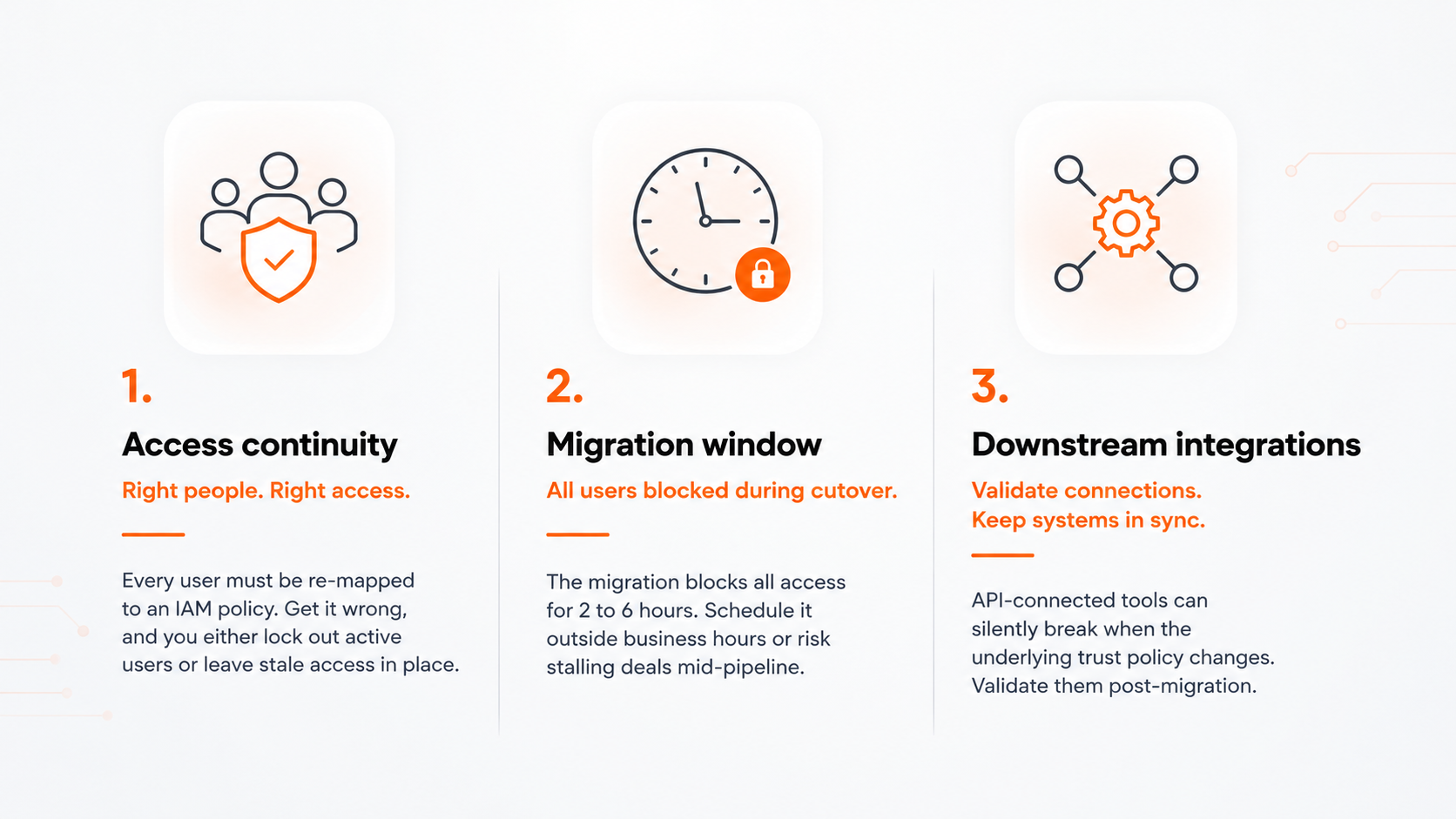
None of this is exotic engineering work, but it is the kind of project that benefits from having done it before. Mapping IAM policies and trust relationships correctly the first time avoids a second round of access troubleshooting a few weeks later.

What a self-managed migration actually costs

Migration guides tend to describe the steps and stop there, which makes it easy to underestimate what those steps add up to on a calendar and a budget. In practice, a self-managed migration touches several distinct workstreams: account linking and business verification, IAM policy mapping for every existing role, user onboarding at scale, solution and listing migration, pipeline and ACE validation, and inevitably some unplanned troubleshooting once the migration is live.

None of these steps is difficult on its own, but together they add up to real engineering time, usually stretched across several weeks rather than a single afternoon. And that's before factoring in the opportunity cost of pulling a senior engineer off customer-facing work to manage it: delayed features, a paused integration, a roadmap item that slips a sprint. For a lot of teams, that opportunity cost ends up mattering more than the direct hours themselves.

AWS Partner Central migration guide: how to approach it without disrupting your pipeline

A clean migration generally follows the same shape regardless of your organization's size:

  1. Audit current Partner Central users and roles, including who's actually still active, not just who's provisioned.
  2. Link your AWS account to your APN account if that hasn't already happened. This becomes your primary account for AWS Partner Central going forward.
  3. Map legacy roles to AWS IAM managed policies before you touch the migration tool, so onboarding is a formality rather than a scramble.
  4. Rebuild API and automation trust relationships for anything authenticating against Partner Central programmatically, rather than assuming existing credentials will carry over.
  5. Schedule the cutover deliberately, outside business hours, with your team briefed in advance, and a rollback conversation already had with your AWS partner contact.
  6. Validate everything post-migration: user access, API integrations, and any automation that touches ACE or Marketplace data.

Frequently asked questions

What is the AWS Partner Central migration? It's AWS's move of Partner Central from a standalone, Salesforce-backed portal into a native service inside the AWS Management Console, with authentication and permissions rebuilt around AWS IAM.

Is the migration mandatory? Yes. Every organization enrolled in the AWS Partner Network needs to complete it to keep using ACE, Marketplace, and partner program benefits.

What happens if we miss the deadline? Based on AWS's current guidance, partners who haven't migrated by the deadline lose access to ACE opportunity submission, co-sell engagements, reseller approvals, and Marketplace solution metadata, with no stated grace period.

How long does the migration itself take? The AWS cutover tool typically runs 2 to 6 hours once you start it. The work that comes before that (auditing users, mapping roles, rebuilding integrations) is what tends to stretch a project out over several weeks.

Can Applify handle the whole thing for us? Yes. That's precisely the kind of migration and identity re-architecture work our consulting team does regularly.

Next steps

Start by confirming where your organization actually stands: log into your AWS Partner Central account and check the migration widget for the specific deadline that applies to you, then pull a list of everyone currently holding Alliance Lead, Cloud Admin, ACE Manager, and ACE User roles.

From there, the sequence is: map those roles to IAM managed policies, rebuild any API-based integrations that authenticate against Partner Central, and schedule the cutover for a window your team can actually monitor. Budget real time for the last step in particular; post-migration validation is where problems tend to surface first.

Migrations like this tend to go wrong quietly, not loudly, which is exactly why it pays to check your setup before the deadline rather than after. Missioned's PCM (partner central migration) compliance accelerator reviews exactly where your account stands against the migration deadline and lays out what's left to close the gap.

Related blogs

No items found.
Let's build what's next
Get in touch
Blog
/
Cloud

Here's what the AWS Partner Central migration changes

Here's what the AWS Partner Central migration changes

If you run any part of your business through the AWS Partner Network (co-sell, Marketplace listings, funding programs, or partner certifications), a significant infrastructure shift is underway.

Atul Sharma
August 6, 2026
6 mins

If you run any part of your business through the AWS Partner Network (co-sell, Marketplace listings, funding programs, or partner certifications), a significant infrastructure shift is underway. AWS is retiring the standalone Partner Central portal and folding it directly into the AWS Management Console, a change often described as the AWS Partner Central console migration since everything now runs through a single AWS interface.

It's easy to file this under "AWS housekeeping" and move on. It shouldn't be. For any organization that relies on Partner Central to manage opportunities, track certifications, or run co-sell motions with AWS, this migration touches identity management, user access, and day-to-day workflows all at once, and it comes with a real cost whether you handle it in-house or not.

What's actually changing

Since November 2025, AWS has been rolling Partner Central into the Console as a native AWS service rather than a separate, Salesforce-backed portal. The practical effects:

  • Authentication moves to IAM. Partner Central access is no longer managed through its own login system. It now runs on AWS Identity and Access Management, using managed policies such as AWSPartnerCentralFullAccess for general access and AWSPartnerCentralOpportunityManagement for anyone (or anything) that needs to create, update, or view ACE opportunities.
  • Marketplace and Partner Central converge. Solution listings, funding requests, ACE opportunities, and program management now live in one console instead of several disconnected tools.
  • Legacy roles don't map one-to-one. Partner Central's old role system (Alliance Lead, Cloud Admin, ACE Manager, ACE User) has to be translated into IAM managed policies via Partner Central Account Management User Role Association, the policy AWS uses to associate a Partner Central user with an IAM role. This is the step most teams underestimate, because the old and new permission models don't line up cleanly.
  • API and automation access need their own trust relationship. Any integration or automation that calls Partner Central's API authenticates through an IAM role whose trust policy allows the partnercentral-account-management.amazonaws.com service to assume it. If you have anything (a script, a reporting tool, a custom integration) hitting Partner Central programmatically, it needs this rebuilt, not just reconnected.
  • A shutdown date is coming. As things stand, AWS has set September 30, 2026 as the deadline for completing the migration, though that date is subject to change at AWS's discretion. Check the migration widget inside your own Partner Central account for the exact date that applies to your organization.

Speed things up with the right partner

To speed up the process, we recommend AWS Partners work with an established AWS Integration Partner for implementation support, since IAM policy mapping and account linking are the two steps most teams underestimate. If you'd rather have a second set of hands on your migration, get in touch with our team to talk through scope and timeline for your setup.

Why this is bigger than an IT ticket

For most partner organizations, Partner Central isn't a side tool. It's where deal registration, co-sell approvals, and funding requests actually happen. A migration that touches identity and access management has three second-order effects worth planning for now:

None of this is exotic engineering work, but it is the kind of project that benefits from having done it before. Mapping IAM policies and trust relationships correctly the first time avoids a second round of access troubleshooting a few weeks later.

What a self-managed migration actually costs

Migration guides tend to describe the steps and stop there, which makes it easy to underestimate what those steps add up to on a calendar and a budget. In practice, a self-managed migration touches several distinct workstreams: account linking and business verification, IAM policy mapping for every existing role, user onboarding at scale, solution and listing migration, pipeline and ACE validation, and inevitably some unplanned troubleshooting once the migration is live.

None of these steps is difficult on its own, but together they add up to real engineering time, usually stretched across several weeks rather than a single afternoon. And that's before factoring in the opportunity cost of pulling a senior engineer off customer-facing work to manage it: delayed features, a paused integration, a roadmap item that slips a sprint. For a lot of teams, that opportunity cost ends up mattering more than the direct hours themselves.

AWS Partner Central migration guide: how to approach it without disrupting your pipeline

A clean migration generally follows the same shape regardless of your organization's size:

  1. Audit current Partner Central users and roles, including who's actually still active, not just who's provisioned.
  2. Link your AWS account to your APN account if that hasn't already happened. This becomes your primary account for AWS Partner Central going forward.
  3. Map legacy roles to AWS IAM managed policies before you touch the migration tool, so onboarding is a formality rather than a scramble.
  4. Rebuild API and automation trust relationships for anything authenticating against Partner Central programmatically, rather than assuming existing credentials will carry over.
  5. Schedule the cutover deliberately, outside business hours, with your team briefed in advance, and a rollback conversation already had with your AWS partner contact.
  6. Validate everything post-migration: user access, API integrations, and any automation that touches ACE or Marketplace data.

Frequently asked questions

What is the AWS Partner Central migration? It's AWS's move of Partner Central from a standalone, Salesforce-backed portal into a native service inside the AWS Management Console, with authentication and permissions rebuilt around AWS IAM.

Is the migration mandatory? Yes. Every organization enrolled in the AWS Partner Network needs to complete it to keep using ACE, Marketplace, and partner program benefits.

What happens if we miss the deadline? Based on AWS's current guidance, partners who haven't migrated by the deadline lose access to ACE opportunity submission, co-sell engagements, reseller approvals, and Marketplace solution metadata, with no stated grace period.

How long does the migration itself take? The AWS cutover tool typically runs 2 to 6 hours once you start it. The work that comes before that (auditing users, mapping roles, rebuilding integrations) is what tends to stretch a project out over several weeks.

Can Applify handle the whole thing for us? Yes. That's precisely the kind of migration and identity re-architecture work our consulting team does regularly.

Next steps

Start by confirming where your organization actually stands: log into your AWS Partner Central account and check the migration widget for the specific deadline that applies to you, then pull a list of everyone currently holding Alliance Lead, Cloud Admin, ACE Manager, and ACE User roles.

From there, the sequence is: map those roles to IAM managed policies, rebuild any API-based integrations that authenticate against Partner Central, and schedule the cutover for a window your team can actually monitor. Budget real time for the last step in particular; post-migration validation is where problems tend to surface first.

Migrations like this tend to go wrong quietly, not loudly, which is exactly why it pays to check your setup before the deadline rather than after. Missioned's PCM (partner central migration) compliance accelerator reviews exactly where your account stands against the migration deadline and lays out what's left to close the gap.

Share this Article: